


Interview with Etienne Jacob
GH: We're so curious to find out: who are you, where are you from, and what do you do?
EJ: I'm an engineer currently living in Paris. I'm 26 and I graduated from the Ecole des Ponts : I was a student there when I started creative coding. I've got a background in data science, computer vision and machine learning from my studies, but I'm not sure this has had much impact on my creative coding work. I started to think I should try making animations with maths and programming after seeing the work of wavegrower in 2016.
GH: What is the underlying philosophy behind your work?
EJ: I mostly make black and white perfectly looping animated gifs. I have kept that constraint for everything I've posted on my tumblr blog, which is where I've got most following and where I post animations I'm satisfied with. I started using Instagram more recently. Tumblr might have less activity now but it clearly was an important place for the development of gif art.
In art I find it interesting to try to get a lot a variety from a constrained style. The artist moonassi is a great example of having a well recognizable style and a lot of interesting variations (and I'm very far from doing that as well as him). I especially like to use a black background so that the square aspect of the gifs can disappear when a webpage also uses a black background. But I'm also interested in colorful stuff and generative stills so I post some of those on Twitter. Although everything is made with code, I try to focus on the visual results more than creativity of underlying algorithms and techniques... I mean that I want people to be able to enjoy the gifs without any interest in programming. I like having elegant and short algorithms but I think the point of the algorithms is the visual result.
At the beginning, I was mostly making 2D animations, but then I made more and more animations of 3D structures, often with very short loops. The use of the OpenSimplex Noise functions is also probably one of the main characteristics of my work.
I identified two main techniques to make perfect loops that I like :
making things move or evolve with periodic functions (for example a sinusoid) and play with an offset (for example the distance to a center)
having queues of objects that replace each other during one loop
The two techniques can be combined and I find it interesting to manage to find other ways to make loops for example by using geometrical tricks, but beesandbombs is greatly taking care of that already :).
GH: Can you pick an artwork and describe your workflow?
EJ: Most of my animations combine previous ideas, techniques and designs I've already used. I rarely introduce a new loop concept, it's the way things are combined that can be new, and also the parameters.
At the beginning I was creating stuff by experimenting a lot with code. But gradually I get a clearer idea of what I will implement and what will work before I start to code anything.
I chose to pick this animation :

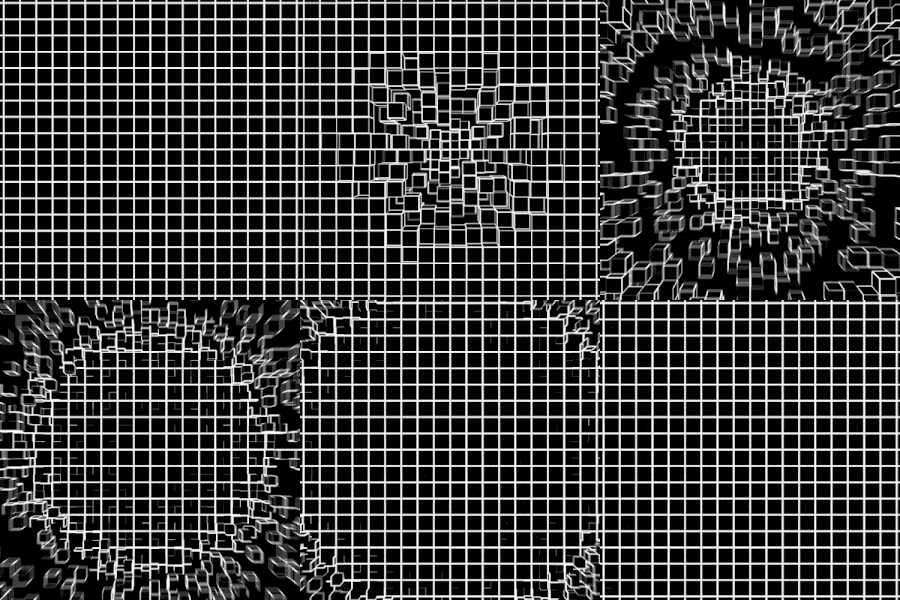
This one was popular and made quickly because it reused code of previous animations. I had already used a lot this animation algorithm for 3D surfaces, and the 3D texture that moves has been refined through making many animations like this. I had already made gifs like that showing a hole and some others showing a tunnel, so the idea here was to try a combination of the two, by using a surface equation that's a mix of hole and tunnel : the surface in the foreground is like a hole and in the background the tunnel continues.
Here's one with a hole :

And another one with a tunnel :

This is an example of combination decided before coding anything and that is likely to work. The new element here was mostly just the new surface equation, but it's quite an important one because it affects a lot how the animation feels when you watch it.
I'm not very proud of the gif but I thought it was a good example.
The process of randomizing lots of objects while keeping a clear structure is also a part of my usual workflow. Tuning the large number of parameters is another part of the usual process.
Something I would like to talk about is that in Processing you don't have shadows, good lighting and advanced materials so it's hard to express 3D structures. The way I manage to express the depth of 3D surfaces is often to cover them with dots and triangles or white stripes that will be smaller with more density in the background, and the opposite in the foreground. I'd very much like to find more ways to render surfaces but it is hard. However when you succeed to draw clearly a 3D surface you can get a nice kind of minimal style because there are no shadows and lighting effects.
GH: What's been inspiring you lately?
EJ: The world of shaders and Shadertoy has fascinated me.
As for some examples of people who often amaze me, there are those : Raven Kwok, Mario Klingemann, beesandbombs, Dirk Koy, @wblut and @mxsage. There are some other people but if I make a longer list I'll be annoyed to exclude some artists that I like.
GH: Tell us about your setup. Where do you create? What tools do you use? EJ: I use Processing to render frames and Gifsicle to make gifs out of them. For instagram I convert gifs to mp4 using FFmpeg and repeat loops because it often fails to loop perfectly once uploaded. I use a template taken from beesandbombs to render frames with motion blur. I also use a lot Java code of OpenSimplex Noise by Kurt Spencer as smooth random functions. More recently I've been using Blender and Python scripts. Maybe I'll switch to openFrameworks instead of Processing later, but I don't think it would affect a lot the results. I'm using an average laptop.
GH: What would you like to explore next?
EJ: I would love to become good at making shaders. I also want to explore more Blender.
Lots of generative artists plot some generative work and that's something I'd like to try at some point. I dream to be able to design sound with code and with ease, but it's probably quite unrealistic. So I mainly plan to explore shaders, Blender and pen plotters and I've already got a foot into shaders and Blender.
– Etienne Jacob, Paris, France


nk88 com mình mới ghé xem qua, chủ yếu tò mò trang có những gì chứ chưa tìm hiểu từng trò. Điều mình thấy khá tiện là nội dung được chia theo các nhóm riêng, nên muốn xem phần thể thao hay casino thì cũng dễ phân biệt, không phải đọc một lượt mọi thứ. Mình thường hơi ngại mấy trang dồn quá nhiều chữ vào cùng một chỗ, nên cách tách nội dung như vậy nhìn dễ chịu hơn. Có mục giới thiệu nền tảng riêng nữa, hợp với người mới chỉ muốn đọc sơ trước khi xem tiếp như mình. Mình chưa thử các tính năng nên cũng không có gì để nhận xét sâu, chỉ nói chút…
dn88tips làm mình chú ý ở chỗ có nhiều nội dung giải trí nhưng nhìn qua vẫn biết trang đang giới thiệu những gì. Mình thường chỉ đọc lướt trước, gặp chỗ nào dồn quá nhiều chữ là hơi ngại xem tiếp, nên cách chia nội dung theo từng nhóm như vậy khá hợp với mình. Có mục thể thao và casino riêng thì cũng đỡ phải tìm giữa một loạt thông tin không liên quan. Mình chưa xem kỹ từng phần nên không có nhận xét gì sâu hơn, chỉ thấy phần giới thiệu ban đầu tương đối dễ nắm, đọc một lúc là hiểu trang có những nội dung nào. Các tiêu đề theo nhóm nội dung trên…
tg88.com có cách chia nội dung khá dễ theo dõi, kiểu mở trang lên là biết nên nhìn vào đâu trước. Mình thường không đọc hết một lượt mà chỉ lướt để tìm phần đang tò mò, nên bố cục rõ ràng như vậy thấy khá tiện. Không cần đoán mục này nằm ở đâu hay bấm qua lại chỉ để kiếm thông tin cơ bản. Một điểm nữa mình thấy hay là có phần kể về nguồn gốc và quá trình phát triển của trang. Mấy nội dung này mình không phải lúc nào cũng đọc, nhưng để riêng ra thì lúc muốn tìm hiểu thêm cũng đỡ mất công. Mình chỉ nói về cách trình bày thôi, còn…
https://8xbetplus.net/ ừ đúng rồi, kiểu lúc ngồi lướt linh tinh trong giờ nghỉ mình ghé qua xem cho biết, không phải để đọc kỹ gì đâu, chỉ muốn coi họ bày trang ra sao mà kéo xuống một cái là thấy mấy tiêu đề to đùng hiện rõ ràng nên mắt bắt chữ nhanh, đoạn “cập nhật link vào trang chủ” nằm khá ngay ngắn ở phía trên nên ai cần đường dẫn chắc khỏi phải tìm vòng vòng; mình còn để ý có cái bảng theo dõi trạng thái đường dẫn nhìn dạng cột, liếc qua là biết cái nào đang ổn cái nào có vấn đề. Menu để chỗ dễ thấy. Cuộn trên điện thoại cũng không bị…
https://cakhiatv.channel/ tối qua lúc đang nghỉ giữa hiệp mình mở lên nghịch thử cho biết, kiểu đang xem dở mà mạng hơi cà giật nên muốn tìm chỗ khác. Vào trang thấy giao diện chia mảng khá gọn, nhìn cái là biết nên kéo xuống hay bấm chỗ nào, không bị rối mắt như nhiều site hay nhét đủ thứ linh tinh. Có chỗ họ ghi rõ chất lượng Full HD 1080p với 60fps ngay trên trang, đọc thì hơi “nghe cho vui” nhưng ít nhất họ để thông tin lộ thiên nên mình cũng yên tâm hơn. Mình xem bằng điện thoại, lướt qua vẫn mượt, chữ nghĩa dễ đọc. Nói chung không phải kiểu hào nhoáng quá, chỉ…